Contributing on Gladys Assistant
Gladys Assistant is an open-source project, and all its code is available on Github.
Anyone can read and modify this code to fix a bug, add features to the backend or to the user interface, and improve the project.
The simplest and fastest way to create an integration, and to publish it to every user in one click, is to build an external integration. No pull request, no code review, no maintainer approval: you write it in the language you like, package it as a Docker container, and publish it on GitHub.
This page is about contributing to the Gladys core itself: fixing bugs, adding features to the backend, improving the user interface, and, for open protocols that truly belong in the core, adding a built-in integration.
What you can contribute
- Fix a bug, anywhere in the backend or the frontend.
- Add a feature to the backend: a new scene action, a new REST endpoint, a new capability in the Gladys API.
- Improve the user interface: new dashboard boxes, better screens, accessibility, and translations.
- Add or improve a core integration for an open protocol (Zigbee, Matter, MQTT). For anything else, prefer an external integration.
Technologies Used
Gladys is a fairly standard Node.js project that uses:
- Preact.js for the frontend (just like React, but lighter)
- Node.js Express as a backend framework
- SQLite for the database
- DuckDB for storing time-series data (sensors data).
- Sequelize as an ORM for the database and migrations
- Mocha for backend tests
- Cypress for frontend integration tests
Setting Up a Development Environment
We have two tutorials depending on your platform:
Directory Architecture
The Node.js Express Server
The backend lives in the server directory. The folders you will touch most often are:
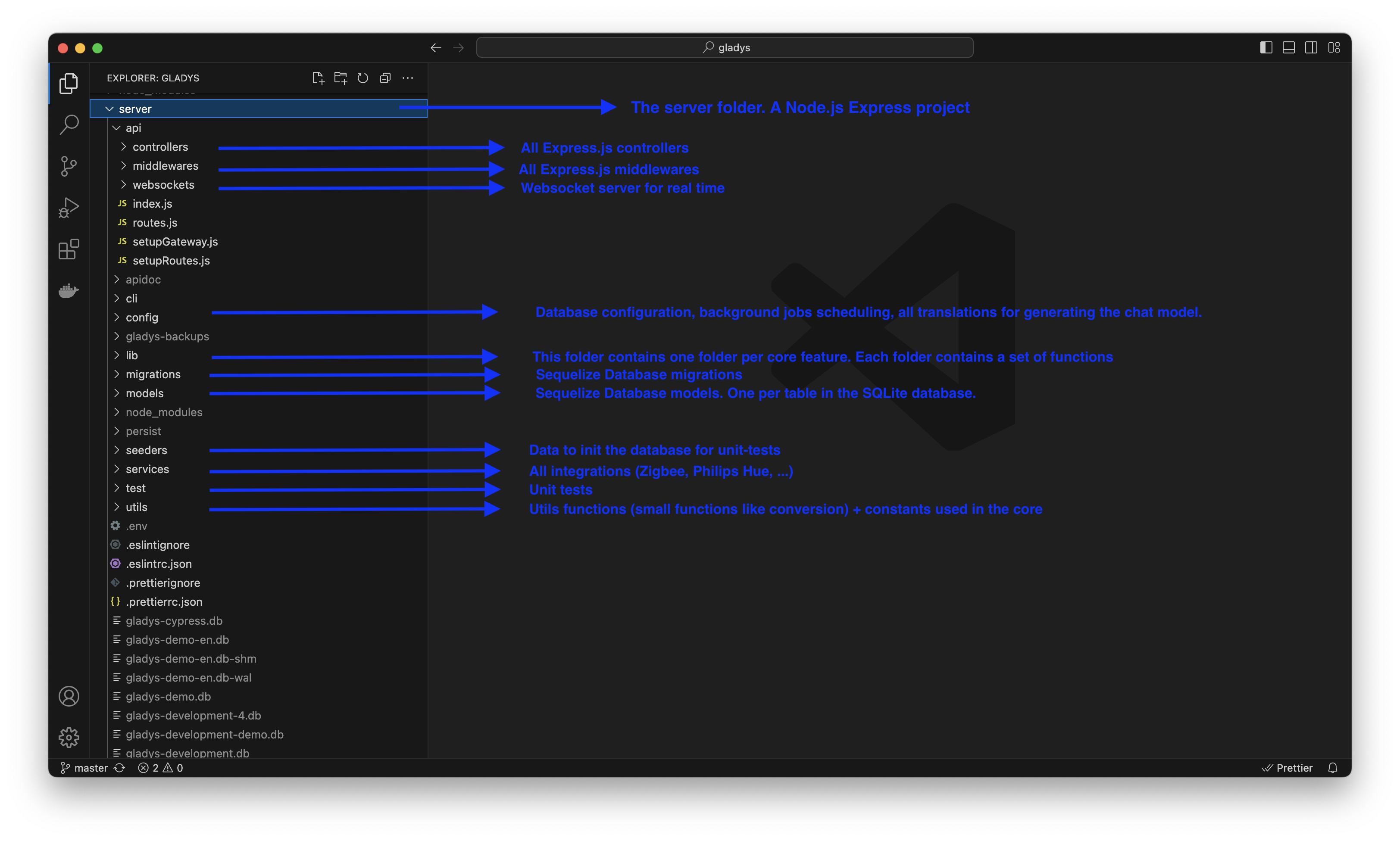
server/lib: the Gladys API, the core domain logic (devices, users, scenes, rooms, and so on). This is where most backend features are implemented.server/api: the REST controllers and routes that expose the Gladys API to the frontend.server/services: the built-in (core) integrations.server/models: the Sequelize models.server/migrations: the database migrations.server/utils: the shared utilities.
Here's a small explanation of all the backend project folders located in the server directory:
The Preact.js Frontend
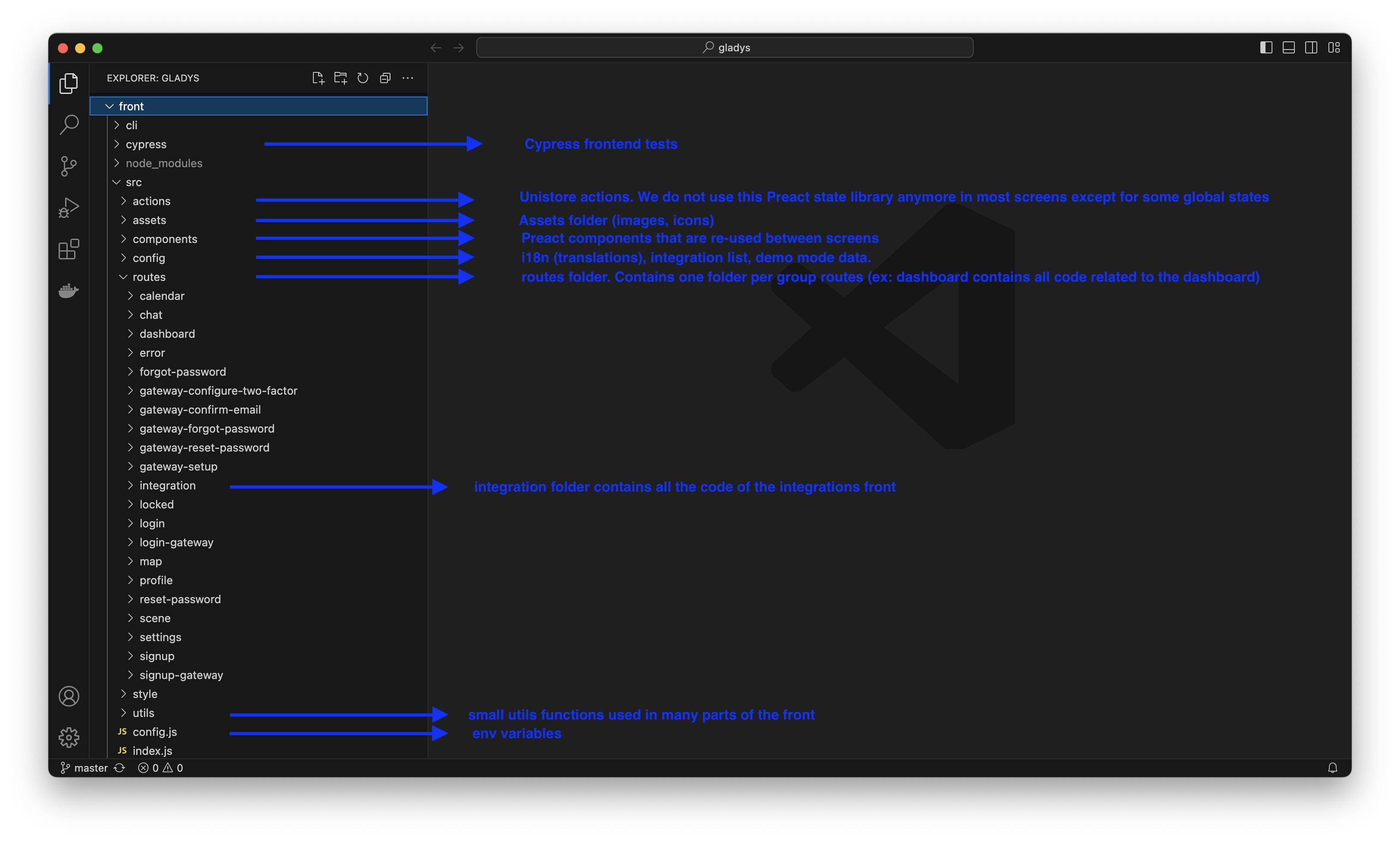
The Preact application was generated by preact-cli:
Working on the backend
When you add a feature to the backend, you usually:
- Implement the logic in the relevant
server/libmodule (the Gladys API). A module should never contact the database with raw SQL; it uses the models and the rest of the Gladys API. If a capability is missing, add a new function to the API. - Expose it, when needed, through a REST route in
server/api. - Cover it with unit tests (see Testing your changes below).
A couple of conventions used throughout the codebase:
- JSDoc comments on functions are mandatory. They document the code and also drive type checking.
- Keep third-party
require()calls inside the function that uses them, not at the top of the file, so a broken NPM module can never crash the whole process.
Core integrations (open protocols)
Built-in integrations live in the server/services directory, one folder per service. Each has a package.json (with the mandatory os and cpu fields) and an index.js that exports a factory exposing at least a start() and a stop() function:
module.exports = function ExampleService(gladys) {
  async function start() {
    // start the service
  }
  async function stop() {
    // stop the service
  }
  return Object.freeze({ start, stop });
};
The gladys argument gives you the full Gladys API. Register your service by adding it to server/services/index.js.
This path is only worth it for open protocols that belong in the core. For everything else, an external integration is faster to build, needs no review, and installs in one click.
Working on the user interface
The Gladys 4 interface is a Preact application in the front directory. The code is organized as follows:
front/src/routes: the pages, one folder per screen.front/src/components: the reusable UI components.front/src/actions: the application state and the actions that mutate it.front/src/config/i18n: the translations (en.json,fr.json,de.json, and so on).front/src/routes/integration/all: the per-integration screens.
To add a feature to the UI, add or edit a route and its components, wire any state through actions, and add every label you use to all the front/src/config/i18n/<lang>.json files so the interface stays fully translated (English and French are the reference languages).
Testing your changes
A main goal of Gladys Assistant is to be ultra-stable and reliable software, so all Gladys code must be tested.
- Backend (Mocha): tests live in the server/test directory. To run them, execute
npm testin theserverdirectory. While developing, you can focus on a single test by adding.onlyto it (be sure to remove it before committing). Your tests must never call real-world APIs: mock all calls to third-party modules, for example with proxyquire. - Frontend (Cypress): see the dedicated Cypress tests page.
Code Quality
We use a fairly strict eslint configuration.
Use VSCode for development to see linting issues in real time, or run npm run eslint in the server directory (and in front) to see all linting errors.
Submitting Your Contribution
Once your change is ready and tested, congratulations! You can open a pull request on GitHub.
Read: Creating a PR on Github
Questions?
Have questions? Come discuss them on the forum!